

Hello everyone,
we want to migrate our Exchange 2013 environment to Exchange 2016 and Server 2016.
At the same time SolidCP will be migrated to a new Windows Server 2016.
Is there an official guide to moving SolidCP to a new server and the necessary adjustments for Exchange 2016?
I would be glad about helpful tips.
Regards

Hello,
At the moment it isnt possible to adjust the providerID for these on the panel (We are working on this). The best method would be to change this in the SolidCP Database.
Kind Regards,
Trevor Robinson

Hello @Trevor
I’m reopening this topic as I believe I’m facing the same issue as the original poster.
I recently migrated my Exchange infrastructure to new servers and I’m able to create a new organization after configuring the new servers in SolidCP.
However, if I shut down the old Exchange infrastructure, I can properly manage organizations created on the new servers, but I’m unable to edit accounts that were created on the old infrastructure.
From what I understand, this issue is related to the database. Could you please indicate where this information is stored in the database and how it can be corrected?
Thank you.
Hello,
To change the provider you need to edit the table [Services] and set the ProviderID against the correct ServiceID.
To get the ServiceID you can load the old service under Configutation -> Servers and check the URL which will show it.
For the ProviderID you can find this in the table [Providers]. For Exchange 2019 this should be 93 but you need to double check on your environment.
Regards,
Trevor
Hello,
Thank you for your reply.
I checked my SQL database but I’m not really sure what I’m supposed to do. Here is a screenshot of the Services table: the old server is highlighted in yellow and the new server in red.
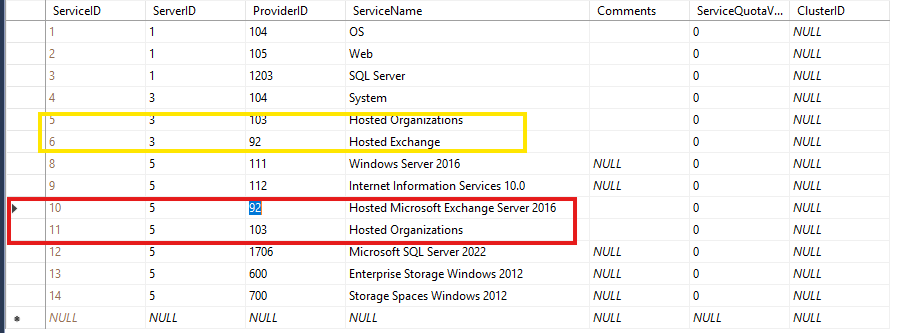
Important information: I did not create a new virtual server, I only changed the services.
